
Stay connected with SIMBA Wi-Fi!
At SIMBA, we believe in keeping you connected wherever you go. We are thrilled to announce the launch of our free public Wi-Fi service, SIMBA Wi-Fi, designed to provide you with seamless Internet connectivity on the go. Free Wi-Fi is also available via Wireless@SG. Download the Wireless@SGx app, supported on Android, iOS, macOS, and Windows devices to connect to Wireless@SGx networks. Please refer to our connection guides below:
Connect to SIMBA Wi-Fi
Step 1

Search for Wi-Fi networks and select WIFI.SIMBA.SG
Step 2
After selecting WIFI.SIMBA.SG, tap on EAP method and select SIM.
Step 3
Click on Connect.
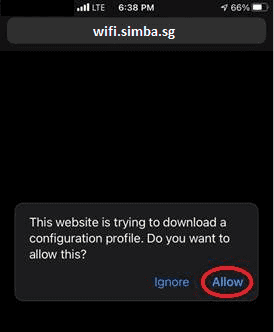
Step 2
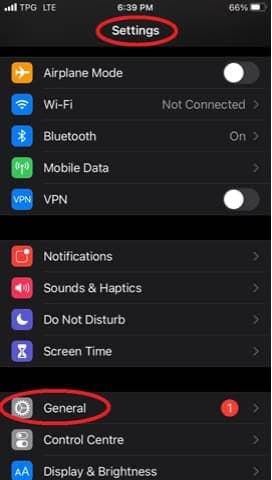
Go to Settings and General.
Step 3
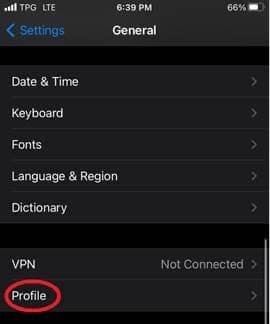
Go to Profile. Select the downloaded profile “WIFI.SIMBA.SG”.
Step 4
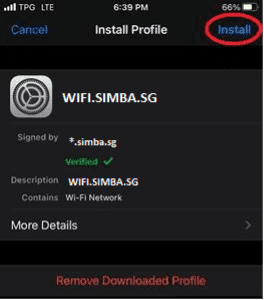
Select Install and enter your passcode when prompted.
Step 5
Go to Wi-Fi settings and you will be automatically connected to WIFI.SIMBA.SG
Connect to Wireless@SG


Step 2
Go to "More" and select "Setup".

Step 3
When asked "Is this device installed with Singapore SIM card", select Yes. You will be automatically connected to Wireless@SGx from now on.
Step 2
Go to "Setup", select SIMBA as your preferred provider, enter the required fields and select "Next".
Step 3
A one-time pin will be sent to your registered mobile number. Key in the one-time pin to connect to Wireless@SGx. You will be automatically connected from now on.